

Timer Can Cause A Dead Oven
Let’s see if we can explain why your oven is dead and will not power on or appears to have no power to it and show you how to fix it yourself if that’s possible.
First off you have to determine the symptoms correctly, stating that the oven just “doesn’t work” or “doesn’t heat up” really doesn’t provide much insight for us into what the actual problem is. Describing the problem better by telling us what is and isn’t working allows a far better judgement of what the failure could be. For example, “the oven fan runs but there’ no heat”tells us that it’s a 90%+ chance that it’s just the fan element that’s faulty or, “the oven is totally dead with no power and no lights at all on” probably means nothing more than someone has knocked the timer to automatic.
Of course whilst we know what the common things are and that you should look for we can’t always be right I’m afraid, remote diagnosis or pre-diagnosis as we refer to it in the industry, can be a hit and miss affair and often it can be down to “best guess”. But it’s a well educated guess and the better the information that we have to begin with, the better service or information we can provide.
Oven And Cooker Clock Timers
Oven timers are a bit of a nightmare at times, especially the old roll round digital ones for being knocked onto automatic and, instantly, your oven will just be totally dead. You will have no lights, no heat from any of the elements and no internal lamp working. It will look, to all intents and purposes, as if the power has been cut to it but the clock will still be running.
Thankfully these sorts of timer seem to be on the wane with less and less ovens or cookers having this type of clock/timer fitted, which is good news for us as it means less silly faults that should not take place. It is very hard to justify charging a customer for simply putting the clock back to manual, especially when how to do that is detailed in the instruction manual.
Essentially there are three basic types of oven or cooker clocks, or timers and I’ll briefly explain each here, but please bear in mind that there are subtle differences between manufacturers and even from oven to oven.
Digital Roll-Round Oven And Cooker Clocks
These types, where the numbers roll around usually to the left hand side, were incredibly popular until recently when electronic clocks have become much cheaper than they used to be.
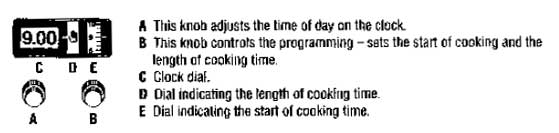
Looking at most of this type you will see something as is shown in the diagram above, from left to right, the time of day in large numbers then two small roll round timers. The first is usually denotes the cooking start time and the next is the cooking time and the manual/auto switch. It is important to note that the two smaller ones can easily be reversed on certain ovens as is the case here.
If the cooker or oven is dead and has one of these fitted, chances are it’s been knocked onto auto, mostly this happens when kids play with the control knobs or they can be accidentally moved while cleaning. The point is you often won’t know why the oven has suddenly died, just that it has.
The cure is fairly simple most times, it’s just a case of switching the oven back to manual.
To do this you MUST have the cooking start time at EXACTLY the same time as the time of day shown on the main clock, otherwise the oven will remain as dead as a doornail. So here’s the way I explain it to people, hopefully this will make sense:
Switch the oven to an on position, any cooking mode will do.
Go to the cooking time dial, make sure that the hand symbol is shown, it looks like a hand or on occasion they use a clock or bell type symbol with a cross through it to say that it’¢s on manual. Do this first.
Now, go to the start time dial and roll it round using the knob/s till you get to almost the time of day. Then carefully, one click at a time work towards the time (it’s only a twelve hour timer so there’s not far to roll round) when you hit the same time on the small cooking time start dial as the main time of day is at then the oven will spring to life.
It is that easy.
Analogue Oven And Cooker Clocks
This type is slightly newer than the old roll round numerical type of clock and tends to create a lot of confusion with people.
This type just looks like a little clock face, a normal one and will mostly be seen on range cookers or rustic/antique style ovens as they tend to fit with the style of those a bit better rather than a digital timer, or an LED clock. Although there has been moves to make these digital with the introduction of Smeg’s new clocks which are digital but the display is looks like an actual clock face.
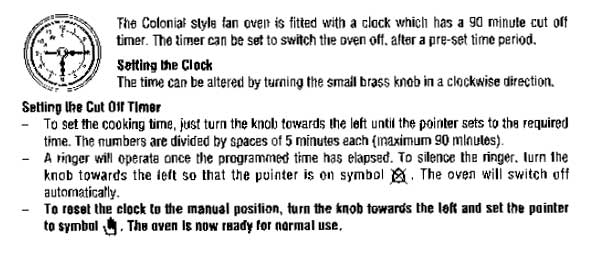
The analogue ones have usually three hands on them, one for hours and one for minutes obviously to tell the time and a third which usually represents the cooking stop time and is the smallest hand of the three.
In the centre there will be a small window or display and, like its predecessor, the hand sign denotes that the oven is on manual. If you don’t see a hand symbol then in all likelihood the oven is on automatic and it will be dead bar the clock still running.
It is very often that I will advise people to use exactly the same method to reset the clock on these types as the previous roll round ones as, essentially, they operate the same way very often, they just look different.
Oven And Cooker Digital Timers
I can cover the basics here but, all too often these days as the timers get more complex, you may well need specific instructions on particular oven timers as there are some really whacky ones about now. 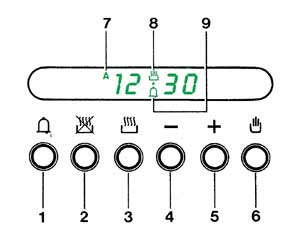
These are brilliant really for the most part, well at least the simple versions are, as they are easy to use and easy to explain.
To the right there’s a diagram of a normal type of digital oven clock, in this case from a Smeg oven and it’s a breeze to operate.
Button number one is the simple countdown timer. Press the button and use the – (Button 4) or + (Button 5) to set the duration of the timer, the clock will then countdown the time you set and beep when the timer expires. You know that the timer is running at a glance as the little bell symbol (number 9) tells you that it’s running.
Automatic Cooking With A Digital Clock
First set the oven up, so you set the cooking mode and also the temperature that you want to cook at. Always remember though that you have the time that the oven takes to heat up.
Button 2 sets the cooking stop time, hence the cross through it and you set this in the same way as the countdown timer. All you do is get the time you want the food to be ready up in the window.
With the button held in you use the – (Button 4) or + (Button 5) to set the time that you want the cooking to finish. The little “A” for Aautomatic should appear in the window, number 7 should then appear.
Then set the cooking time in exactly the same way only you hold down button 3 then set the duration that you want to cook for in minutes.
Easy, isn’t it?
To return to manual operation at any time press Button 6, the hand symbol, to get back to manual cooking.
Of course the massive advantage of this type of clock on a cooker or oven is that it is very clear and very clear what is actually happening unlike its predecessors.
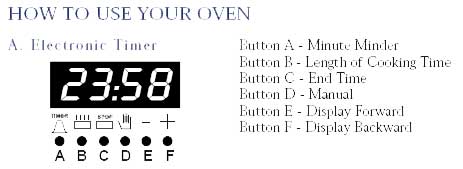
Same thing, only different. Most oven clocks work on the exact same principles
Points To Note About Oven And Cooker Timers
There are a host of other problems or component failures that can give the same symptoms and these vary from model to model. Things like thermal cut-off switches, commutator switches and internal fuses can all present the same symptoms, even the clock/timer itself being faulty can give exactly the same fault symptom as the oven on automatic, you’ll just see it as the oven is dead.
However it very much worth trying to reset the clock before calling an engineer to repair the machine, even under warranty as many manufacturers will treat this as a chargeable call to you. The way they see it you didn’t read the instruction that they provided and the machine is not faulty.
🙁 Hi while cooking on hob we heard 2 bang from kitchen found that the hob and oven not working and a burning smell from under hob …. No power trip either can u let me know ths priblem and how to fix Many thNks
Hi Melanie,Better to ask in the forums where the engineers will be able to help but they will need the make and model numbers at least.
I have Leisure RCM10FRKP freestanding dual-oven range cooker which is now outside of warranty. IMO symptoms are that the timer clock has gone completely blank and the main fan oven dill not come on at all. The grill and other oven still work as normal so I am making an assumption that the timer is the problem and is not allowing the fan oven to be instructed to work. Does this sound like a timer replacement will solve the problem. If so you seem to have the part on your website.
It is possible but there is also a thermal cutout that can cause that as well.Best to ask in the forums where the engineers will see the enquiry.
I just want to say what a really helpful website you have.My cooker appeared DEAD and with four children has been a real pain to be out of action. The Delonghi cooker is five years old andI have not had a problem with it before until friday.I followed your advice regarding the timer and the oven is working again..!!Your site has saved me a call out fee for an engineer which is fantastic.Many Thanks A very Happy Mother
I have Leisure RM5CVW freestanding dual-oven cooker which is now outside of warranty. IMO symptoms are that the timer clock has gone completely blank and the main fan oven will not come on at all. The grill and other oven still work as normal so I am making an assumption that the timer is the problem and is not allowing the fan oven to be instructed to work. Does this sound like a timer replacement will solve the problem.
Could be or there could be a protection device for overheating causing it as well, if fitted to that model.
This website is the best!! As someone with little or no practical common sense, its really helpful and youve just saved me £££s as I thought I’d need to get an electrician out or even get a new cooker, and it turns out its just the clock!Awesome, thanks again.
DIPLOMAT MAIN OVEN FAILURE. Yet another case where the automatic timer was the cause of the failure. Thank you so much, you have saved me the cost of a call out fee.
The beeper on the timer is getting softer and softer – is there any kind of quick fix?
No, very doubtful as it’s a buzzer within the clock unit normally so it it would probably need a replacement clock.
the beeper sound on the timer is getting softer and softer – is there a quick fix?
I can’t seem to turn off the ringer for my Select 610 Diplomat. It is going constantly.
I cant seem to turn off the timer/ringer of my Select 610 Diplomat. It is going off constantly.
That is liable to be a faulty timer but you would need the model number from the rating plate to get a part.
Thanks! We had a power outage and then our over looked like it was dead. I reset the clock and it was working again 🙂
My cooker clock has the digital kind & I can clearly see it is set to Auto as it says that on it. However none of the buttons work at all on it, I do t suppose there’s any other way of setting it back to manual? I’ve tried switching whole thing off but still comes up as auto?Thanks
HELP!!!!! My cooker blew the fuse and will not turn on. My landlord sent an electrician whom has checked and said the cooker if faulty however the safety switch in the kitchen blows the fuse without the cooker being on at all? It won’t allow a power supply! I find it hard to believe the cookers at fault when it won’t even come on??Is it possible that the main safety switch or electrics might be at fault..
Please help my digital clock on my indesit oven hasn’t worked for some time after having a power cut the other day I have since had no heat from the element of the oven and the disply is constantly making a ticking sound, how do I fix this problem when my disply doesn’t work? Thankyou
My Smeg cooker stopped working and it turned out to be a safety thermostat in the back. Really easily fixed but need to know what you’re looking for. Only about a tenner to so do look out for that, the repair people charge a fortune.