Login Issues
We have had multiple reports of a failure to be able to login to the forums and we are investigating this over time. This page will be updated as reported issues are resolved or resolutions are found.
There are a few reports of a simple inability to login and a few where people have received and error report relating to permissions. We are looking into this but it is not an error that we have encountered during testing and it does not affect all users as the majority of users have been able to login and post on the forums as normal.
All links used on this support page will open in a new tab or window allowing you to flick back to this page for reference.
Please ensure that your browser is up to date as we cannot guarantee that anything will work on older browser models we are aware however that Internet Explorer 6 and older will not work or will only offer limited functionality as will older versions of Firefox.
You can get the latest versions of the major browsers from the respective links below.
Mozilla Firefox
3.6 latest version tested and working correctly for forums use. Some graphical elements may not display correctly on main content site.
Microsoft Internet Explorer
Version 8, 9, 10 and Edge, latest versions, tested and working correctly for forums use. Some graphical elements may not display correctly on main content site.
Safari
Latest release 5.0.4 works correctly across the entire site.
Google Chrome
Latest version working correctly for forums use. Some graphical errors on main site. Occasionally seems to not display images correctly, especially in news and scrolling items.
Failure To Login
We know that the “Member Login” function at the top of the homepage is not working at present, that will be repaired shortly we hope which will allow you to login directly from the homepage.
To login from the forums page, from this link, do the following:
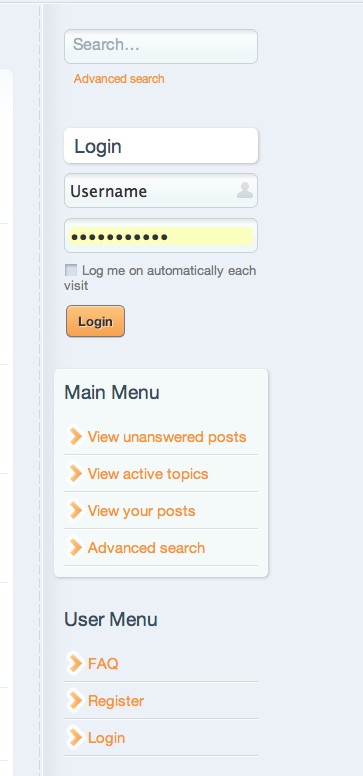
You can use the login box on the right hand side of the forums main page.
Enter your username and password then (if required, but makes life easy) check the “Log me on automatically each visit” checkbox.
Click the “Login” button.
This should log you into the forums.
Alternative Method
You can also select the “Login” link shown under the “User Menu” section. If you do this you will see the following screen:
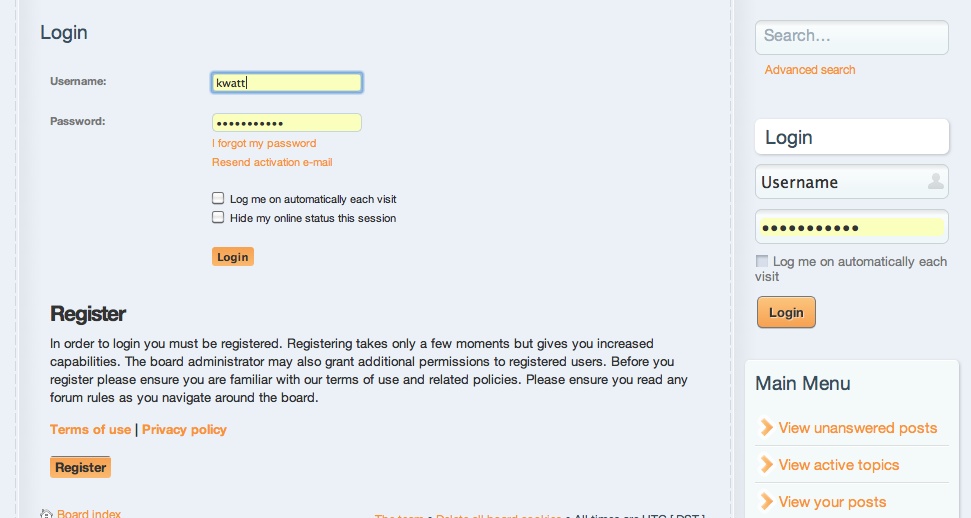
Essentially this is the same process as above but with slightly more options available.
Other Errors
Unable to remove files within ./cache/. Please check directory permissions
This error should now be resolved.
However, should you come across this error after 1pm Saturday 12th March, in order to help us with track down the reason why it is happening to some users and not others could you please send us the following information to help track down the cause:
Your operating system
Your browser and browser version
The time you got the error
This information is of course treated as private but it can help hugely in investigating the cause of the error you are getting.